

Published on June 12, 2026
10 min to read
How to Write Instagram Captions That Drive Engagement

Summarize with AI

Table of contents
Summarize with AI

ChatGPT

Claude

Perplexity
Share

Vista Social

X (Twitter)


There’s a specific kind of disappointment in posting something you’re proud of and watching it flatline. The shot was sharp, the reach was fine, and then nothing. No saves, no replies, no clicks through to the thing you sell.
More often than not, the caption is where that post lost the room. For a brand, the caption is the few seconds where attention turns into understanding, and understanding turns into a customer. A weak one quietly caps what every other part of your marketing can do.
If you searched how to write Instagram captions and you do this for a living, you’re not after cute lines to copy. You want captions that earn reach and move people, written fast and on brand across every account you run. That’s who this guide is built for.
Table of contents
What makes an Instagram caption work in 2026
A caption works when it earns a reaction Instagram can count. Saves, shares, and replies tell the platform a post was worth someone’s time, and it answers by showing the post to more people. Instagram has said the quiet share into a DM does more for that reach than a like ever will.
The hard part is earning the first second. Your reader spends more than 18 hours a week on social, most of it at speed. Cameron Gidari, who runs social and innovation at Major League Baseball, framed it well. People don’t have a short attention span so much as “a short consideration span.” They’ll read every word if the opening earns it and scroll past in a blink if it doesn’t.
So be realistic about how captions get read. Many people skim or skip them, leaning on the visual and the first line. A few years ago you could run a long, flat caption and still get read. Now the opening has to make someone choose to keep going.
Three things carry a caption. The hook earns the tap, the structure holds the reader, and the close asks for one thing. A caption can’t rescue a weak post, but it’s what turns a good one into a save, a reply, or a sale.
How to write an Instagram caption, step by step
Five moves turn a blank caption box into something that earns its place. Run them in order.
1. Lead with the hook
The first line is the headline, and often the only line anyone reads. Open with a question, a sharp number, or a claim that earns curiosity, never your brand name. “We cut reporting time in half last quarter” beats “Big news from the team” every time. Win the first line and you’ve earned the right to the rest.
2. Write for the reader, not the brand
Make the reader the subject of the sentence. “You can see every client’s results on one screen” lands harder than “We’re proud to announce our dashboard.” The fastest lift in caption engagement comes from talking about the reader’s job.
3. Ask for one thing
Give a caption a single job: save it, reply, or tap the link. Stack three asks and most people do none of them, so match the one ask to the goal of the post. A confused reader does nothing, and one clear action beats a pile of competing ones.
4. Match the caption to the format
Length and shape follow the format, not a rule. A Reel caption can be one line that backs up the on-screen hook. A carousel caption sets up the swipe and rewards it. A single image often needs the caption to carry the whole story. Write the first two lines as if the rest won’t be read, because often it won’t.
5. Lead with keywords, then tidy the hashtags
Write the way your audience would search, and put that phrase in the first line or two, because Instagram now reads captions to decide who sees the post. Keep hashtags to a relevant few. Search-friendly wording in the caption now does more for discovery than tags ever could.
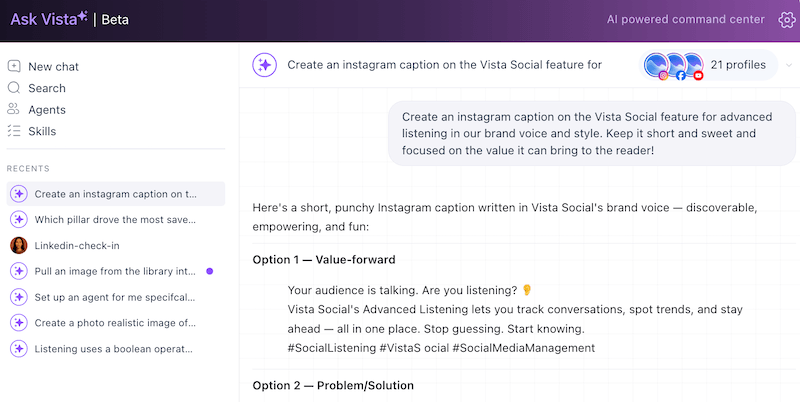
Even a strong writer stares at a blank caption box. The AI in the Vista Social Composer drafts a first version in your brand’s voice, so you’re refining instead of starting cold. Want to draft on brand faster? Start free with Vista Social.
Ten Instagram captions that work, by industry
Theory only goes so far. Here are ten brand captions doing the work in 2026, across very different industries, with what to take from each. Pair them with the screenshots so the team can see the move, not just read about it.
B2B SaaS: Semrush
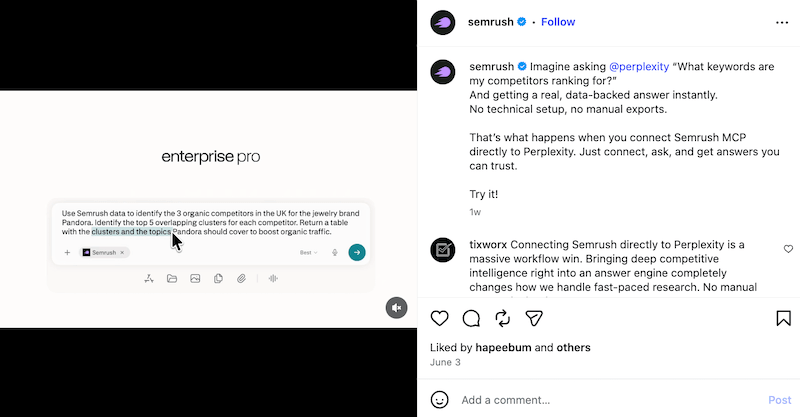
The caption opens “Imagine asking…” and drops the reader straight into a result they’d normally need an analyst for, then reveals the product as the way to get it.
Steal this: open with the outcome your reader wants, and introduce the product as the route to it.
Professional network: LinkedIn
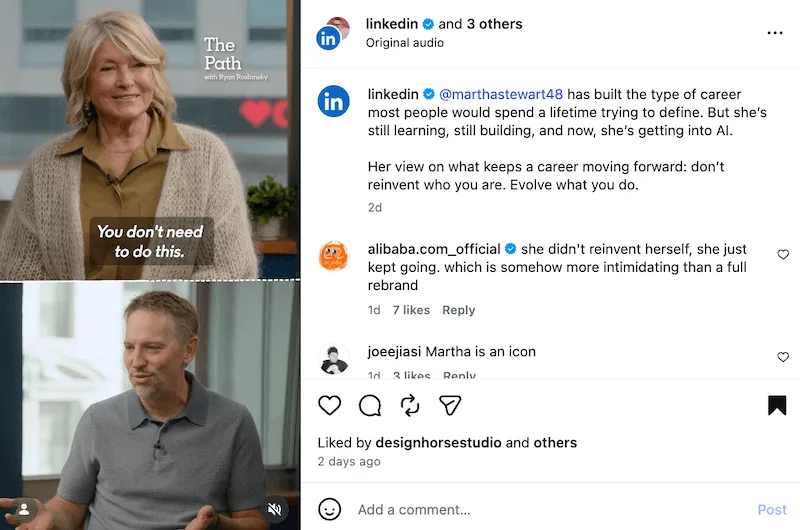
It tells one person’s career story and leaves a portable line: don’t reinvent who you are, evolve what you do. The story earns the read, the lesson earns the share.
Steal this: wrap your point in a specific story, then hand the reader a line worth repeating.
Commercial real estate: CBRE
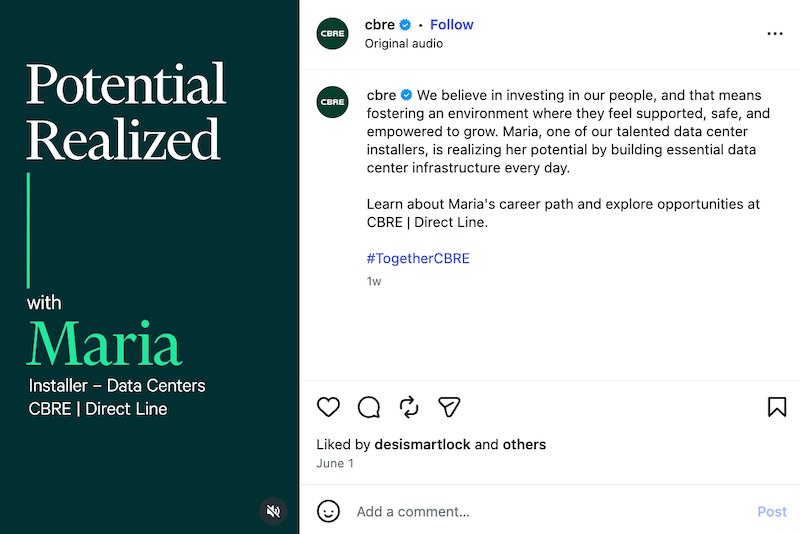
An employee’s career story carries the employer brand, tied to a real person building real infrastructure rather than a values statement.
Steal this: show your culture through a named individual, not adjectives.
Professional services: EY
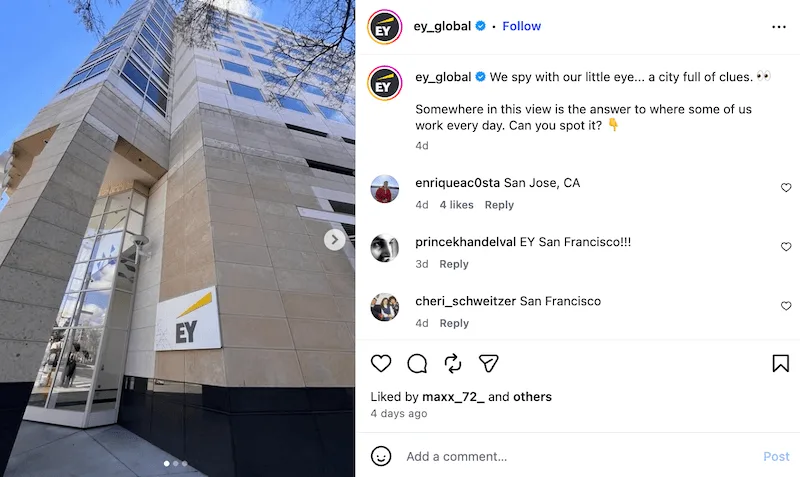
A playful “can you spot it?” turns a photo of an office building into a guessing game, and the comments fill with people naming the city.
Steal this: a low-stakes question can turn a flat brand photo into a real conversation.
Fintech: Wise
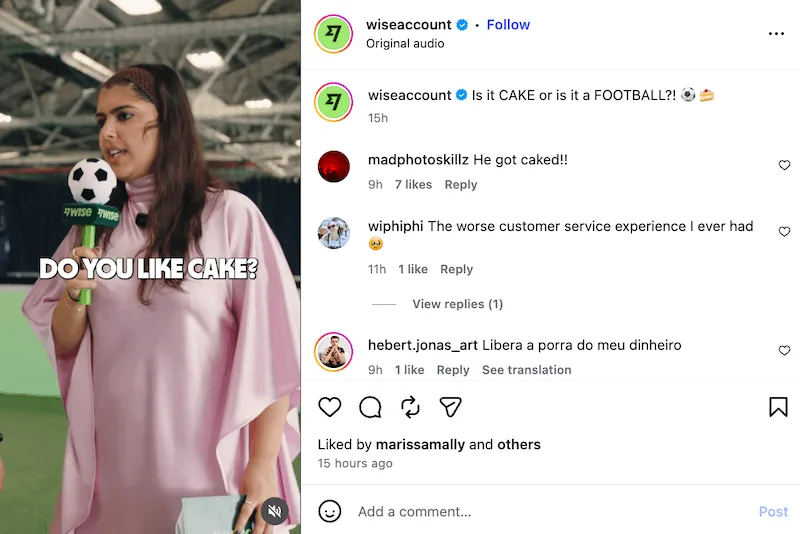
“Is it CAKE or is it a FOOTBALL?!” is a pure pattern break from a money-transfer brand, riding a meme to stay human in the feed.
Steal this: not every caption has to sell; some exist to keep the brand likeable and seen.
Higher education: Harvard Business School
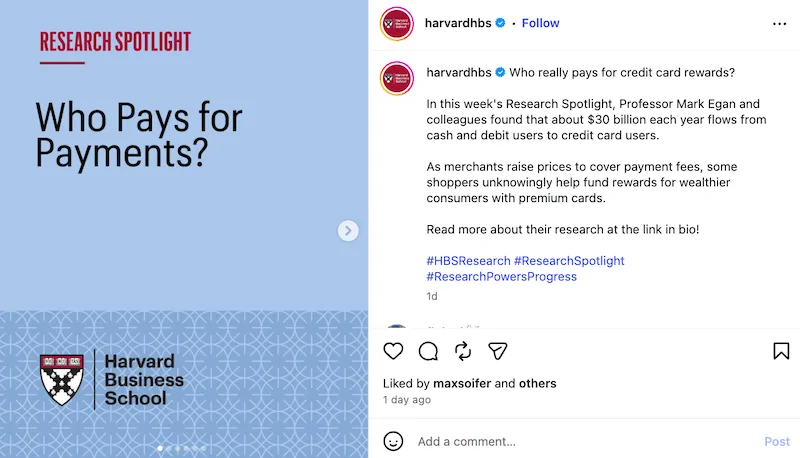
“Who really pays for credit card rewards?” opens a research finding with a question their audience has quietly wondered, then delivers the surprising number.
Steal this: lead research or data with the question it answers, not the methodology.
Health publisher: Healthline
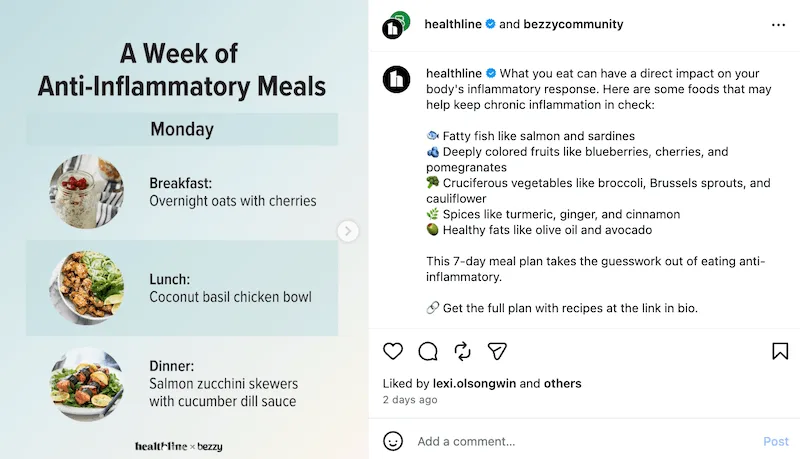
A carousel caption previews a genuinely useful week of meals, points to the full plan, and names the medical reviewer and source. It earns the save by being useful and trustworthy.
Steal this: make the caption a reason to save the post and show your sources to earn trust.
Logistics: Maersk

A journey through the Panama Canal, packed with “did you know” facts and ending on a question for followers to answer, makes heavy industry feel curious.
Steal this: turn expertise into a few surprising facts and one open question.
B2B branding agency: Focus Lab
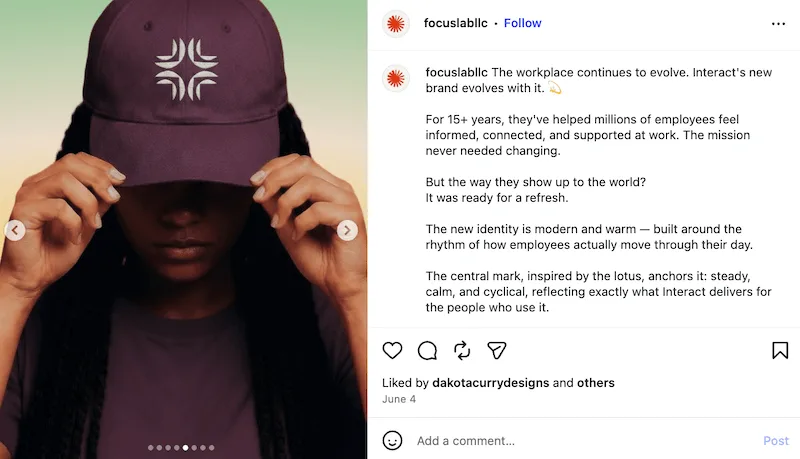
A rebrand told as a short story: the mission that stayed, the look that changed, the thinking behind the new look. It shows the work and the why, not just the final logo.
Steal this: narrate the thinking behind the work so a portfolio post becomes a point of view.
Wellness app: Calm
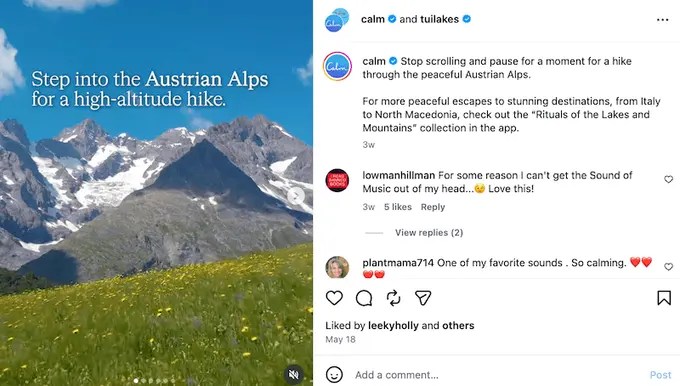
“Stop scrolling and pause for a moment” matches the product’s entire promise in a single line. The voice is the brand.
Steal this: when the caption sounds exactly like what you sell, every post reinforces the positioning.
Instagram caption formatting, spacing, and limits
A few best practices keep captions readable and stop Instagram from cutting them off in the wrong place.
What is the Instagram caption character limit?
Instagram caps captions at 2,200 characters, including spaces, emojis, and hashtags. That’s roughly 330 to 440 words, far more than most posts need. There’s no separate word limit, only the character count, so the real question is how much your reader will read.
How long can an Instagram caption be?
You can use the full 2,200 characters, but the feed shows only about 125 before the “more” cutoff, and a Reel or Explore preview shows even less. What’s visible before the cutoff changes by surface, so check how your caption looks in the feed, in Explore, and on a Reel.
How do you add spacing and line breaks?
Write the caption with proper line breaks in a notes app, then paste it in, since typing straight into the box or leaving trailing spaces can strip your empty lines. A scheduling tool that preserves spacing keeps the layout intact. White space is what makes a long caption feel readable instead of like a wall.
How many hashtags should you use in 2026?
Fewer than you used to. Instagram’s head, Adam Mosseri, has said hashtags no longer boost reach; they categorize a post for search rather than spread it. A focused set of 3 to 5 relevant tags now does more than a block of thirty. Treat hashtags as labels for search, not as a growth lever.
Do captions help you get found in search?
Yes, and this is the real shift for 2026. Instagram works like a search engine now, weighing the words in your caption when it decides what to surface. The cleaner and more specific your wording, the more often the right people find it.
Does hashtag strategy differ on TikTok?
The direction is the same, the details differ. On TikTok, the algorithm leans on your audio, on-screen text, and caption keywords. A few hashtags mostly signal which side of the app you belong on, like #BookTok. On Instagram, caption keywords carry discovery and hashtags simply categorize. Either way, write for search first.
Writing Instagram captions for business, at scale
Creating one good caption is great. Writing them across ten brands or clients every week without the voice drifting is an operations problem. Three habits keep quality and voice intact:
- A written voice guide per brand: Three traits, a few example lines, and a short list of words to avoid, so a new writer matches the voice without guessing.
- A brief, not a blank box: Hand the team the goal, the audience, and the one action for each post before they write, so captions start aimed in the right direction.
- An approval step before publish: Route captions through a reviewer or the client so a brand’s voice survives even when three people are writing it.
In Vista Social, a brand voice trained on each account holds drafts on-brand from the first line. Approval workflows then let an editor or client sign off before anything ships. Consistency like this is part of a larger social media marketing strategy. At scale, a consistent voice is what makes a brand recognizable before anyone reads the logo.
Using AI to write captions without losing your voice
AI is genuinely good at the blank-page problem. It can turn a rough brief into three caption options in seconds and match a format you’ve used before. Where it falls short is judgment, the read on whether a line is funny, flat, or off-brand.
The trick is to feed the AI your context, not just a prompt. Vista Social’s AI Knowledge and brand voice let you train the AI on your tone, rules, and past captions. Drafts come back sounding like you. Ask Vista answers plain-language questions about your accounts. The MCP connection lets you draft and pull data through Claude or ChatGPT in the same flow. That covers a Reel, a carousel, or a single image.
Then you edit. Cut the generic lines, sharpen the hook, and add the detail only you know. AI in social media marketing keeps moving fast, but the human still decides what ships. AI gets you a fast first draft; your judgment is what makes it sound like your brand and not everyone’s.
How to know if your captions are working
Likes tell you a post was pleasant. Saves, shares, replies, and dwell time tell you it was useful. For a brand, those are the early signals of consideration, the people most likely to click, sign up, or buy.
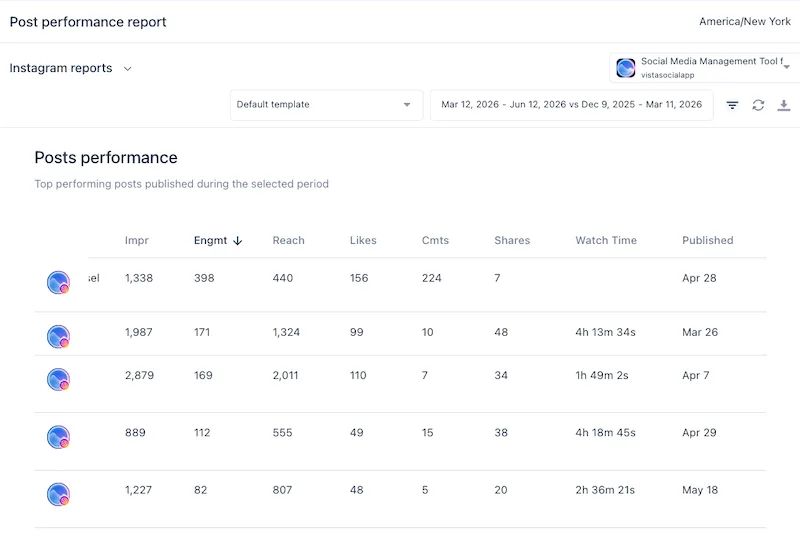
Read them per caption, not just per post, so you can see which hooks and which asks moved people. Your social media analytics should show saves and shares next to each post. A quick scan then tells you which captions earned the reaction you wanted. Track captions at the line level, because the post’s headline numbers hide which words did the work.
Over a month that becomes a pattern: the openings that land, the calls to action that convert, and the length your audience reads to the end. That pattern is your style, earned from data instead of a guess.
Write captions that earn their place
The caption is the cheapest growth lever a brand has. No new shoot, no media budget, just a sharper first line and a clearer ask. And it’s the lever most teams reach for last.
Treat it like the system it is. A first line that stops the scroll, a caption shaped for the format, one action worth taking, and a voice that stays yours across every account. Do that consistently and captions stop being the afterthought and start being the reason a viewer becomes a customer.
When you want to write on brand, schedule at the right time, and see which captions earned their saves, all in one place, Vista Social is built for exactly that.
Frequently asked questions
Does editing an Instagram caption after posting hurt your reach?
No. Instagram’s engineering team has confirmed that editing a caption does not penalize your post or reset its algorithm ranking. It only pauses search indexing for a brief moment while the system re-scans the new text for keywords.
Which caption action does the algorithm value most for feed distribution?
Shares via DMs (Sends per Reach). Head of Instagram Adam Mosseri explicitly stated that sending a post to a friend via DM is the strongest signal for reach. While saves show personal value, shares tell the algorithm your content is universally engaging, pushing it out to non-followers.
Does spam-tagging multiple accounts in your caption help discovery?
No, it harms it. Instagram’s Search and Recommendation Guidelines explicitly label tagging unrelated accounts as “engagement bait.” While tagging relevant partners helps, spamming handles to force reach will cause the algorithm to actively downrank your post.
How does keyword placement in a caption affect Instagram Search?
Earlier is better. Instagram operates like a visual search engine, reading caption text to categorize your content. Official creator guidelines recommend placing your primary, descriptive keywords in the first two lines of the caption to ensure accurate indexing before the feed cutoff.
Try Vista Social for free
A social media management platform that actually helps you grow with easy-to-use content planning, scheduling, engagement and analytics tools.
Get Started NowAbout the Author

Content Writer
Orion loves to write content that refuses to be boring. As part of Vista Social, he helps brands, creators, and agencies stop doom scrolling and start winning with social media. When he's not in front of a keyboard, he's watching films in IMAX with his wife, dissecting football tactics (the European kind), and getting lost in a good book.
Loading related tools...

The most complete social media management platform for teams who demand more.






Tools
PublishingAnalyticsEngagementIntegrations
FacebookInstagramLinkedInRedditSnapchatThreadsTikTokX (Twitter)YouTubeMCPVista Page (link-in-bio)All IntegrationsCopyright © 2026 Vista Social LLC. All Rights Reserved.